|
|
|
|
|
| Architosh News Reports | |
| Architosh Staff ([email protected]) |
|
|
|
Special Expo Report: Part - 3 - page 2
Apple AirPort Wireless Internet Connectivity When Steve Jobs introduced the iBook during the keynote last Wednesday and ran it through a hula hoop while connected to the Internet we all know what we were looking at ... and we were indeed impressed! But Apple went a step further. One great step. They introduced the Apple AirPort wireless Internet networking "flying saucer"-like object. What a brilliant little product rapped in a truly captivating industrial design. The AirPort looks like a miniature, classic flying saucer; and the TV commercial Jobs showed was a great parody on the flying saucer (aliens visiting us from another world) cultural construct. Everybody will identify and remember the commercial because we all know that icon. And the commercial is funny to boot! However, the AirPort isn't just a brilliant little idea. It may be the best method to connect your LAN to the Internet, using the device's high-speed 11-Mbps performance.
Courtesy of Apple Computer, Inc.
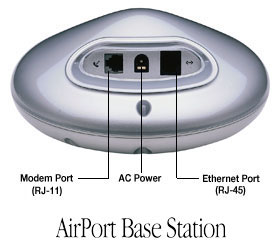
The device also has one feature right now that others do not have: support for QuickTime 4 Streaming video (we have not verified if it supports Real Video and Internet gaming software). The price is similar to the XRouter at just under $300.00 plus $100 for every AirPort card installed into a iBook computer or a Lucent WaveLAN PCMCIA Network Interface card installed in a CardBus slot on any PowerBook or in a PCMCIA external port connected to any Mac's Ethernet port. At the Expo, a group of iBooks and PowerBook G3's (with Lucent WaveLAN cards) were all connected to one Apple AirPort Base Station. The AirPort Base Station supports up to 10 wireless devices and allows you to surf the Internet, check your e-mail, and download files from any location within 150 feet away from the AirPort. While the device is clearly targeted at the home user (this is apparent in the product advertising and marketing materials) this device may do just nicely in the small or medium sized firm who plan on having just a few mobile machines go wireless. For instance, you may want a few executive-focused PowerBooks (principal's machines) , an iBook on the table in the conference room or office library and a super-powerful multimedia machine in a computer Habitech Security Station (Charrette item no. 18-1280) all connected wirelessly to the AirPort Base Station for Internet access. The AirPort has a single Ethernet port (RJ-45) and Modem port (RJ-11). The Ethernet port can connect directly to a DSL line or cable modem -- or it may connect directly to a local area network (LAN) for "terrestrial Internet access", presumably through a gateway machine or device like the XRouter by MacSense. In the last configuration the Internet access from a AirPort wireless enabled machine would be via the AirPort which in turn would access the Internet gateway device. How all of these settings would be configured is not yet clear to us (we only know that in the TCP/IP control panel you would select "AirPort" as your connection port. Additionally, to extend the reach of 150 feet it is possible to ... "add more base stations to provide coverage for your entire location." For more info see the following TIL articles. AirPort Base Station description.
WaveLAN and WavePOINT-II Access Point Lucent Technologies worked with Apple secretly for a year and a half on the AirPort technology and have additional complimentary wireless technologies. Lucent's technologies are built around the proposed IEEE 802.11 DSSS local area network standard, the same standard as the AirPort. The WavePOINT-II Access Point product is a hardware box with dual PCMCIA slots that receive the wireless cards, allowing you to use two WaveLAN PCMCIA network interface cards each on a different frequency channel. The box is physically about the size of a small laptop computer, but thicker and in off-white. The PCMCIA cards -- the same ones available for PowerBook G3's and other PowerBooks with PCMCIA card slots -- are black. We asked a representative if the WavePOINT-II Access Point and WaveLAN cards were compatible with QuickTime streaming software as well as RealVideo, and he said they were. While we didn't think of looking for this at the Apple Pavilion -- where PowerBook G3's were equipped with WaveLAN cards accessing the AirPort Base Station -- PowerBook G3's next to iBooks were being used by the many onlookers to surf the Internet and presumably check out the new QuickTime TV streaming channels. Since the AirPort is built around the same technology as Lucent's WaveLAN products and Apple and Lucent have worked for 18 months together one would think Lucent's products work just as well as Apple's AirPort in terms of Internet streaming video. Lucent's WaveLAN architecture supports a wireless-to-wireless bridging feature that allows you to build an extension to your wireless network without expanding the wired backbone. Other configurations and options are described further on their website. One such option is to create a stand-alone workgroup, because the technology is based on a cellar structure. Adding more cells to your wired and wireless areas will create a "premises wide infrastructure" where mobile users can roam freely and stay connected to network services.
Other LAN to Internet Technologies Farallon also makes a new PCMCIA wireless LAN networking card. This product is also IEEE 802.11 DSSS compatible with products from Lucent, Nokia, Maxtech and Zoom, and the new AirPort Base Station. Unlike the 11 Mbps speeds of the AirPort PCMCIA card in the new iBook and AirPort Base Station, this product reaches only 2 Mbps access speeds. The wireless product is cross platform compatible and comes with Macintosh control panel software for easy configuration. The Lucent products come with only Windows software for system analysis and configuration (but perhaps Macintosh or Web browser-based software is forthcoming) which makes one wonder how you set the products up on a Macintosh-only network. Farallon also makes HomeLINE Internet sharing products that make use of existing home phone lines (in walls and out) to connect a small home LAN to the Internet. Asante also makes their FriendlyNET Dual 56K modem and ISDN line Internet sharing products for LANs. The hardware product provides easy all-in-one solutions for home or small business networks requiring multi-user high-speed Internet connectivity, security, phone and fax support and Ethernet to IP router functionality. The product is compatible with Macs, PC's and UNIX boxes and works with any TCP/IP network regardless of OS. One World makes the One World Systems Communications Server 5000 family of products for single point Internet, e-mail, fax and remote access LAN services. At one point in time this was one of the only real ways to get your office or home LAN on the Internet at a reasonable cost. Now these products seem very expensive compared to the technology solutions listed above; however, the fax server could save you up to $10,000 in the first year alone if your office faxes more than 25 pages of faxes each day. The products include hardware and software items. The main product is a dual 56k modem hardware box or ISDN line box that provides a fully integrated solution providing network, intranet, and Internet connectivity from anywhere. There are three separate servers: OneWorld 5000 Remote Access Server, OneWorld 5000 Fax Server and the OneWorld 5000 Suite Server. We asked the One World representative if they would be coming out with a cable modem version of their product line and they said a lot of people have been asking the same question. At the moment no, but that may change quickly because the demand for cable seems to be outpacing the demand for ISDN and DSL services. Having a cable modem version of their fax, and remote access server products only makes sense These are good products and should be considered especially if remote access and fax serving is a high priority for your office (probably not for your home or studio LAN). Closing Comments Having this many choices (and many more are likely to emerge over the next year) for connecting your LAN to the Internet and providing inexpensive Internet and e-mail services to all of your client machines is great news for the Mac and PC community. The issues, as always, include how much money you can afford to spend and what are your requirements For home and small office users, Apple's AirPort Base Station in combination with compatible products for desktop Macs may be all you need. Because the AirPort allows for terrestrial connections to your LAN you can have a single gateway machine running a software solution such as SoftRouter Plus or IPNetRouter and extend to a wireless segment of your LAN with the AirPort Base Station or Lucent's WavePOINT-II Access Point device. Add a secondary WavePOINT-II device and extend your LAN wirelessly to cover your full premises. The options are clearly much larger and more complex with all of the new technologies; however, we favor the wireless direction because that is likely where all of the technology going anyway. If you have comments or info to report on any of these products or technologies please send them in so we can share them with the rest of the Architosh community. Thanks.
Expo Report Series: Page 1 of Special Expo Report: Part - 3 Special Expo Report: Part - 4 (Expo Photos)
|
| Feedback | Back to Architosh News |
|
|
|
|
|
|
|
|
|
|
|
|